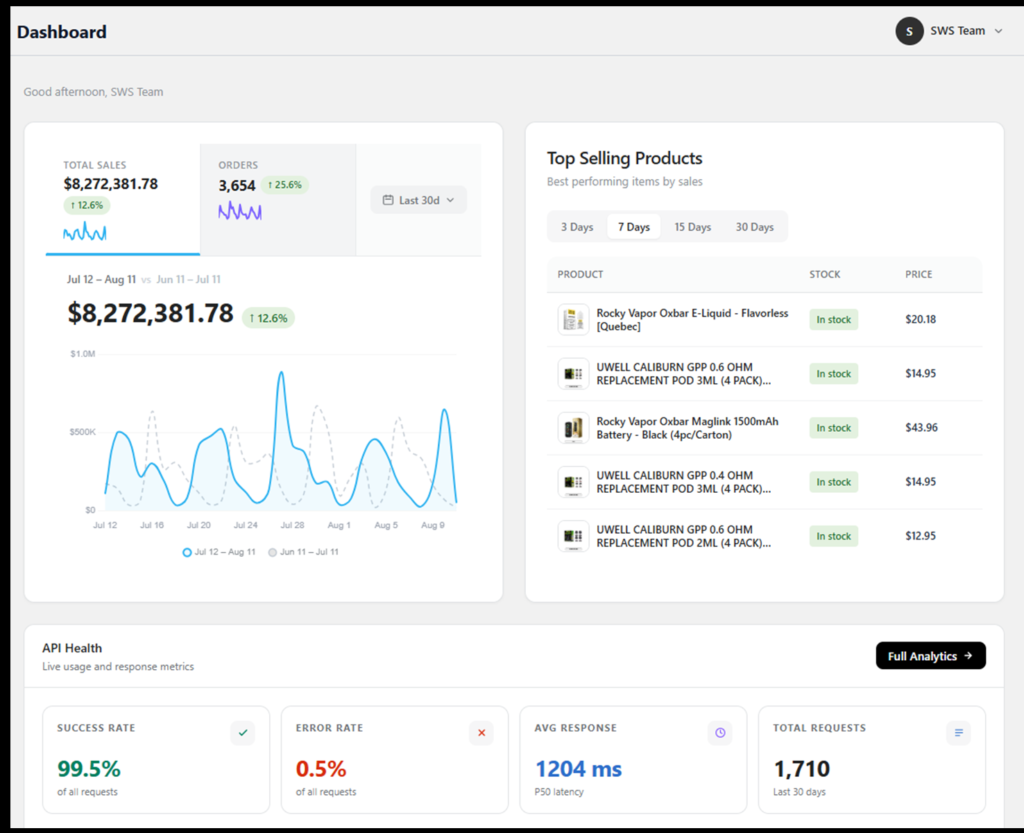
Spider Rep is a Shopify-integrated wholesale Application built for distributors and B2B sellers. It brings order management, customer analytics, automated discounting, retention tracking, and location intelligence into one platform, connected directly to your Shopify store in real time.
Who is Spider Rep built for?
Spider Rep is built for wholesale distributors, B2B brands selling direct, and multi-location sales teams who sell through Shopify and need more structured order, pricing, and customer management than Shopify's native tools offer.
Do I need an existing Shopify store to use Spider Rep?
Yes. Spider Rep connects to an active Shopify store with appropriate API access - it's built as a companion platform to Shopify, not a standalone storefront.
How long does it take to set up?
Spider Rep connects to your Shopify store using secure API credentials - the platform reads your store configuration automatically, so there's no custom setup or development work required to get started.
How Spider Rep Connects to Shopify
How does Spider Rep sync with Shopify?
Spider Rep uses real-time bidirectional sync powered by Shopify webhooks. Order creation, payment changes, fulfillment updates, and customer modifications are captured instantly - no manual refresh or polling required.
Does Spider Rep create real Shopify orders?
Yes. Orders created in Spider Rep automatically generate as draft orders in Shopify, and convert to live orders once payment is confirmed.
Will my existing Shopify data sync into Spider Rep?
Yes. Spider Rep can pull your full customer database, product catalog, collections, and order history from Shopify, making it instantly available inside the platform.
Can I still use Shopify admin alongside Spider Rep?
Yes. Spider Rep is designed to work alongside Shopify admin, not replace it - most day-to-day order and customer management can happen entirely inside Spider Rep, with everything reflected back in Shopify automatically.
Order Management and Pricing
Can I edit an order after it's been paid?
No - orders marked as paid are locked entirely, in line with Shopify's financial security policy. Unpaid orders can be edited, including basic details, notes, and shipping/billing address, though line items and discounts cannot be modified once a draft is unpaid but locked for other reasons.
How do wholesale discounts get applied?
Discounts are configured once in the Discounts module - by customer tag, product, or order value - and then applied automatically during order creation. Eligible discounts surface directly in the order, with an "Apply All Eligible Discounts" option available.
What discount types does Spider Rep support?
Five types: Tag-Based Discounts, Buy X Get Y, Product-Specific Discounts, First Order Discounts, and Bulk Discounts. Each can be created, edited, and saved as Draft or Published.
Can I import discounts in bulk?
Yes. Product and bulk discounts can be imported directly via CSV from the Discounts dashboard - useful for onboarding large catalogs or updating pricing across many SKUs at once.
What shipping options are available on orders?
Standard, Pickup, and Custom shipping - matching Shopify's native shipping model, with the selected option visible as a tag in the order's Payment Summary.
Customer Data and Retention Analytics
Can customers have multiple addresses?
Yes. Spider Rep supports multiple billing and shipping addresses per customer, with a built-in search bar to quickly find the right address when building an order.
How does retention analytics work?
Retention Analytics tracks product performance and repeat purchase behavior across 3, 7, 15, and 30-day windows, with drill-down views showing total units sold, unique customers, repeat customer count, and retention rate per product.
Can I filter retention data by date range or collection?
Yes. Retention can be filtered by product collection with a custom date range, helping identify seasonal trends and collection-level repeat purchase behavior.
Team Access and Security
How many user roles does Spider Rep support?
Three: Super Admin, Admin, and Sales Representative - each with configurable, module-by-module permissions covering View, Create, Edit, and Delete access.
Can I control exactly what each team member can see or do?
Yes. Permissions are granular and configured per module by the Super Admin (or Admin, for Sales Rep roles) - so team members only access what's explicitly enabled for their role.
Who can reset a user's password?
Super Admins can reset passwords for any user. Admins can also reset user passwords when granted that specific permission.
Data Protection and Compliance
Is Spider Rep secure?
Yes. Spider Rep is independently verified with A+ ratings for Security Headers (Snyk), SSL/TLS (Qualys SSL Labs), and HTTP Observatory (Mozilla). The platform also undergoes regular full-system security audits and uses single-store data isolation.
Spider Rep includes a built-in, in-app support system - submit questions, report issues, or request features directly from inside the platform, without switching to email or external tools.
Where can I see what's new in Spider Rep?
Every update is tracked on our Changelog, including new features, improvements, and fixes by version.